
Automation & agents

AI automation. Agents for your business.

Fixed workflows run on n8n or Power Automate. Where a task needs judgement, AI agents take over: they read, sort, prepare and hand over to your team.

Discuss a workflow
  1. Contact enquiryForm or email
  2. Update the CRMCreate contact, check duplicates
  3. Propose a meetingDraft approved by sales
An enquiry becomes a meeting. No retyping.

Example 1: enquiries

An enquiry becomes a sales meeting.

An enquiry arrives by form or email. The workflow checks required fields and duplicates, creates the CRM contact and drafts a reply with a meeting proposal. Sales reviews and approves with one click.

  1. Contact enquiry

    Form or email

  2. Update the CRM

    Create contact, check duplicates

  3. Propose a meeting

    Draft approved by sales

Check & assign

Required fields · Duplicates · Owner

Question or approval

A person decides

Every run stays traceable, failures included.

Fixed steps run in n8n or Power Automate. AI only takes on what needs judgement: sorting the enquiry, drafting the reply. Unclear cases go to a person.

Example 2: knowledge

Find company knowledge. Respect access rights.

How does a return work? What does the framework agreement say? An agent searches approved documents, answers with its source and shows only what the person asking may see. If it cannot answer, it says so.

If you work in Microsoft 365, we build on Copilot Studio and deliver the agent in Teams. For custom agents we use LangChain and LangGraph, with LangSmith for traceability and testing.

Internal knowledge assistant

Check the signed-in user’s access

How does a return work?

Answer with source, permitted documents only

  • Product documents
  • Internal procedures

Open sources and check the answer

Illustrative view · no customer data

Before launch we test with different user accounts, missing sources and questions the agent must not answer.

How a workflow gets into daily use.

We start with one workflow that costs time today and build it through to approval. What the agent may do and when a person decides is written down.


  1. Understand the work

    On site or in a working session: map tasks, handovers and typical exceptions.


  2. Define the requirements

    The result, data sources, rights and the point where a person approves. Plus criteria for the pilot.


  3. Choose the tools

    n8n, Power Automate or LangGraph, models from OpenAI, Anthropic or Mistral: the choice follows the task, your setup and costs.


  4. Test in a pilot

    Real example cases, approvals, missing details and failures. If you prefer, we test first ourselves.


  5. Introduce & support

    We train your team, hand over the documentation and, on request, set up the dashboard for cost and performance.

After rollout

See what is running. And what needs attention.

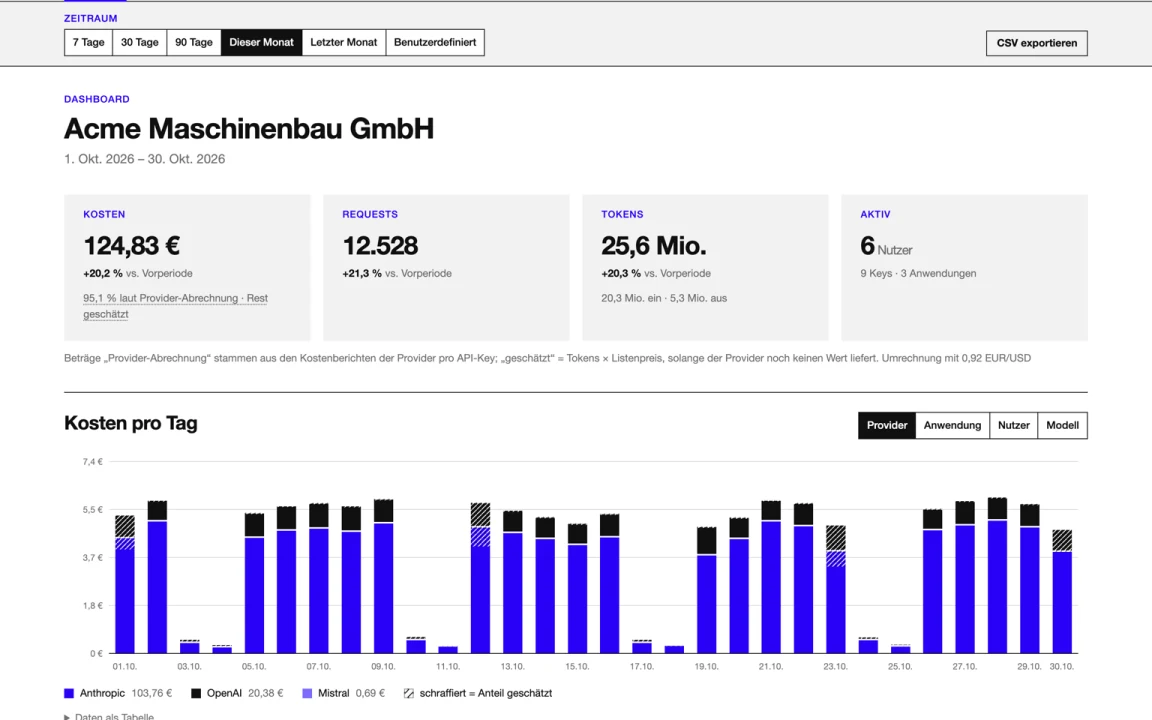
Our cost and performance dashboard shows performance, cost and usage per application, user and API key. Anomalies show up in the chart, not just on the provider’s invoice. Runs and failures stay traceable in the logs.

Support, monitoring and response times are agreed separately. Implementation, provider charges and operation are listed separately.

Questions before getting started

When does a workflow need AI?

Fixed rules can run as a workflow. AI can help with steps such as classifying an enquiry or preparing a response draft. Uncertain cases and agreed approvals remain with your team.

How is an AI agent checked before rollout?

The pilot covers typical cases, missing information and exceptions. Data sources, access rights and steps requiring human approval are defined in advance.

Explore projects and case studies →

Which task keeps coming back?

A concrete example is enough to start. You do not need a finished solution or a technical specification.

Let’s talk about your project